Dext Canada: Why We Use It for Small Business Bookkeeping
Every bookkeeper has seen the shoebox. A year of receipts — faded thermal paper, a few crumpled gas slips, a restaurant bill with the total worn off — handed over in March with a hopeful look. By then half of them are unreadable, and the ones that survive still have to be sorted, coded, and matched to the bank feed by hand.
That problem is exactly what receipt-capture software solves, and it's why we put most of our clients on one. If you've looked up Dext Canada pricing, or wondered whether Dext actually beats the receipt tool already built into QuickBooks, this is the honest version — what it does, where it's genuinely better, where it isn't, and how it lines up with what the Canada Revenue Agency expects you to keep.
We're a CPA firm, not a Dext reseller. So this is a review, not a sales pitch.
Key takeaways
Dext (formerly Receipt Bank) captures receipts and bills, extracts the data, and publishes it to QuickBooks Online, Xero, or Sage — turning paper and PDFs into coded, reconciled transactions with the source image attached.
The Canada Revenue Agency requires you to keep records for six years from the end of the tax year they relate to, under subsection 230(4) of the Income Tax Act. Clean electronic images make that six-year obligation painless.
For GST/HST input tax credits, the supporting document needs more detail as the amount climbs — the supplier's GST/HST number and tax amount once a receipt hits $100, and a description plus your name at $500. Dext captures exactly those fields.
Hubdoc is gone. Xero retired the standalone Hubdoc platform in May 2026, replacing it with storage-only "Xero Files" — no extraction. That changes the math for Xero users deciding what to use.
Dext isn't for everyone. A sole proprietor with a handful of receipts a month is well served by the free capture built into QuickBooks; Dext earns its keep at volume, across multiple currencies, or when a firm standardizes one workflow across many clients.
What Dext actually is
Dext started life as Receipt Bank and rebranded in early 2021. The product most people mean when they say "Dext" is Dext Prepare — the capture-and-extract engine. You feed it a receipt or a bill, its optical character recognition reads the document, and it pulls out the fields that matter: supplier, date, total, taxes, and where the document supports it, the individual line items. Dext claims roughly 99% extraction accuracy; in our experience it's strong, and noticeably better than most tools on messy or handwritten paper.
There are two siblings worth knowing about. Dext Precision is an accountant-facing tool that checks the data quality of a client's books — flagging stale balances, duplicate entries, and ledger problems before they become year-end problems. Dext Commerce pulls sales data out of e-commerce and payment platforms like Shopify, Stripe, and PayPal. For a typical small business, Dext Prepare is the one that matters; the others run in the background or live on the accountant's side.
How the workflow actually works
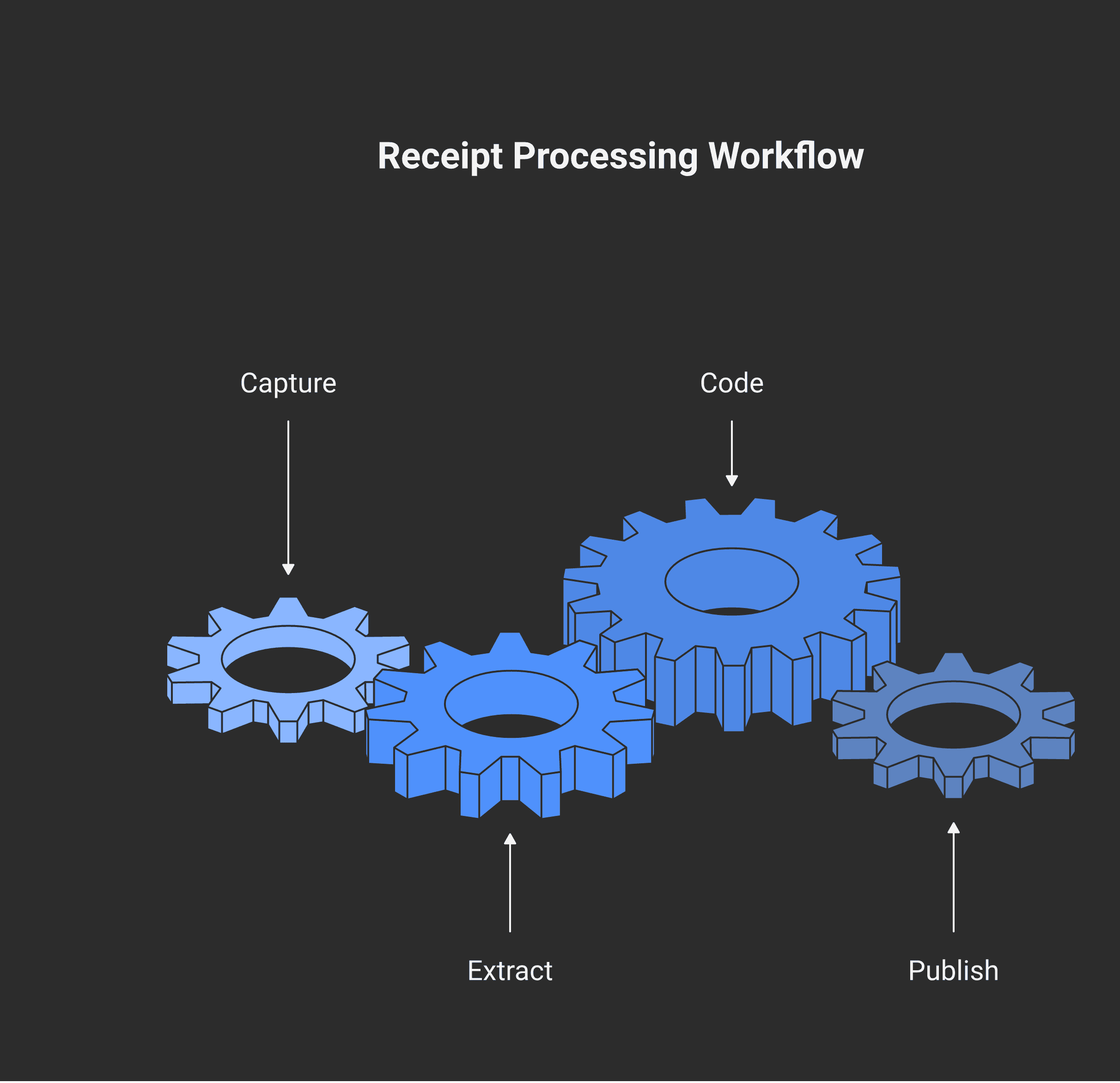
The reason a tool like this changes a business owner's life isn't the OCR — it's that the receipt never has to be touched twice. A document gets into Dext one of four ways:
Snap it in the mobile app the moment you get it;
Email it in to a unique Dext address (point your supplier billing emails there and they file themselves);
Drag and drop PDFs on the desktop; or
Fetch it automatically from connected suppliers and banks.
Dext reads the document, then supplier rules and machine learning do the coding — this vendor always maps to that expense account, that tax rate, this currency. You review, then hit Publish, and the coded transaction lands in QuickBooks Online, Xero, or Sage with the source image attached to it. The image lives in both places. No shoebox, no re-keying, no "what was this $43 charge?" in March.
Why we use it for clients: the CRA records angle
Here's where a receipt app stops being a convenience and starts being compliance.
The Canada Revenue Agency requires you to keep your books and supporting documents for six years from the end of the last tax year they relate to (subsection 230(4)). That's a long time to hold onto thermal-paper receipts that fade to blank in 18 months. CRA accepts electronic records — including scanned or photographed images of paper source documents — under its electronic record-keeping guidance (Information Circular IC05-1R1), provided the images are accurate, legible, accessible for the full retention period, and producible on request.
One honest caveat, because it matters: to actually destroy the original paper and rely only on the image, your imaging process has to meet the national standard the CRA points to, CAN/CGSB-72.34, Electronic Records as Documentary Evidence. A clean Dext image is excellent record-keeping and almost always good enough in practice, but using Dext doesn't, by itself, give you a blanket licence to shred everything. Think of it as supporting CRA-compliant electronic records — not a magic eraser for paper.
The other place Dext quietly helps is GST/HST. To claim an input tax credit, your supporting document has to carry progressively more information as the amount rises. The thresholds were raised in 2021 and now sit at:
Under $100: supplier name, date, and total.
$100 to under $500: the above, plus the supplier's GST/HST (Business) number and the tax amount.
$500 and over: all of that, plus your name, the payment terms, and a description of what was supplied.
Those are precisely the fields Dext extracts. A complete capture — supplier, date, total, supplier's GST/HST number, tax — generally pins down the prescribed information for the everyday $100-to-$500 band, which is exactly the documentation an auditor asks to see. If you ever face a CRA review or audit, a tidy, searchable archive of source documents is the difference between a quick verification and a painful reconstruction.
Dext vs Hubdoc vs native QBO and Xero
This comparison changed in May 2026, and it changed in Dext's favour.
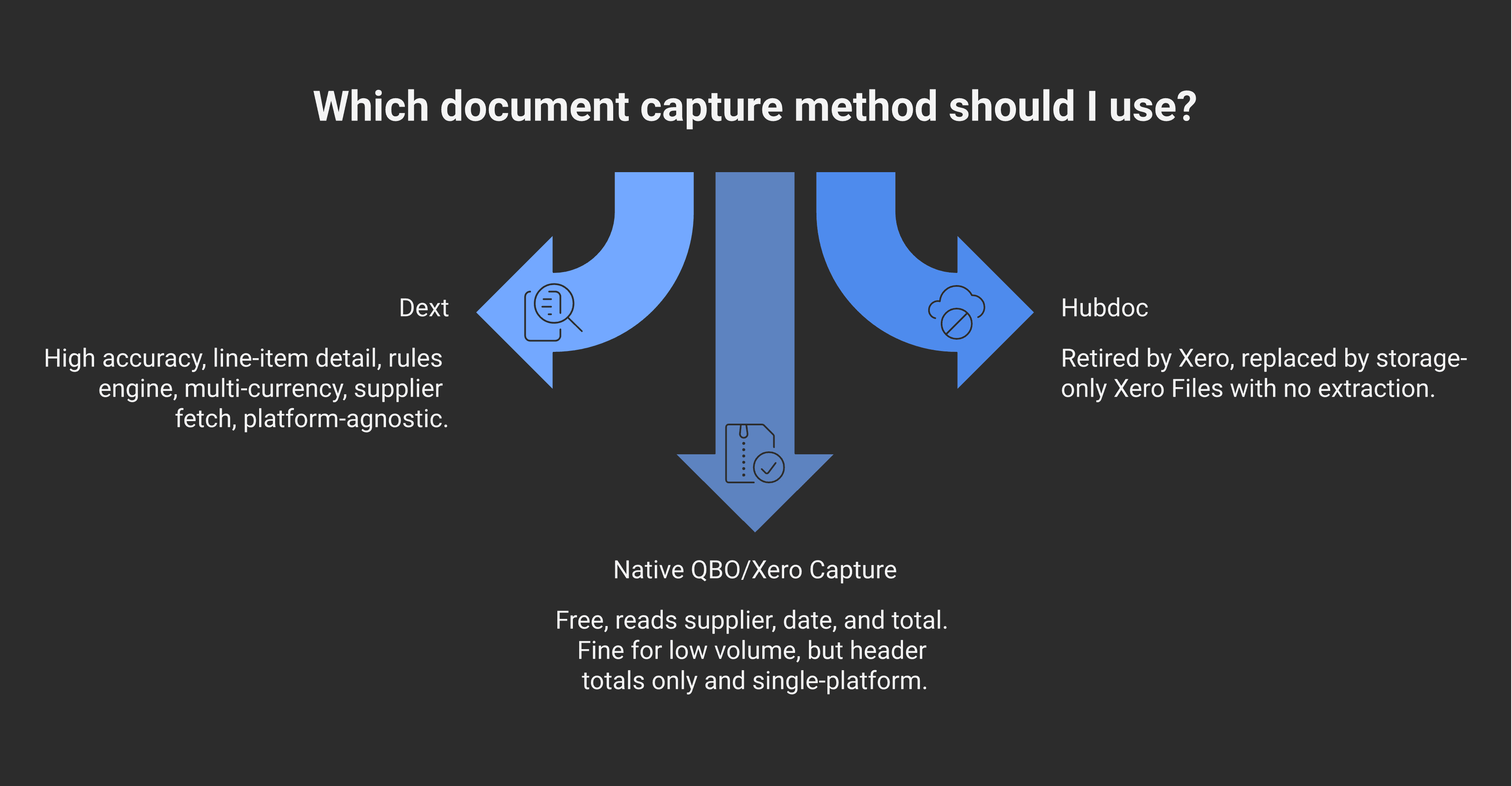
Hubdoc is no longer an option. Xero retired the standalone Hubdoc platform and replaced it with "Xero Files," which only stores attachments — no OCR, no line-item extraction, no supplier fetch. For Xero users who leaned on Hubdoc's free capture, the realistic choices in 2026 are now native Xero entry, a third-party tool like Dext, or going back to manual data entry. That's the single strongest argument for Dext among Xero clients right now.
Native QuickBooks Online receipt capture is genuinely good, and it's free with your subscription. Snap a receipt, QBO reads the supplier, date, and total, and creates an expense. For a low-volume business — a handful of receipts a month, one currency, no need for line-item detail — that's honestly enough, and we'll tell a client so rather than sell them something they don't need.
Where Dext earns its keep is at scale and complexity: higher accuracy on messy documents, line-item-level extraction (native tools usually grab only the header total), a real rules engine that scales coding across dozens of vendors, multi-currency handling, automatic fetch of invoices from utility and software portals, and — for our firm — the ability to run the same standardized workflow across many clients on different accounting platforms. Dext is platform-agnostic; QBO's tool only works inside QBO.
What it costs
Dext prices by the number of users and the volume of documents you process each month, across a few tiers, with a free trial to start. The entry tier suits a single small business with modest receipt volume; higher tiers raise the monthly document allowance and add users. Go over your monthly document limit and uploads still queue, but they won't be data-extracted until your next billing cycle or an upgrade.
Because software pricing shifts and varies by region and currency, check the current Canadian figures on Dext's own pricing page rather than trusting a number in a blog post. The structural point is what matters for your decision: you're paying a modest monthly subscription to eliminate manual data entry and produce an audit-ready document archive. For most businesses past the very smallest, that trade is easy. For a firm managing many clients, the per-client economics improve further.
Setup and onboarding tips
A few things make the difference between Dext that hums and Dext that frustrates:
Connect the accounting software first so your chart of accounts, suppliers, and tax rates sync in before you start coding.
Build supplier rules early. The first time you code a recurring vendor, set the rule — account, tax rate, currency — so every future document from them codes itself.
Put the email-in address to work. Forward your recurring supplier invoices (software, utilities, telecom) straight to Dext and they file without anyone lifting a finger.
Snap at the point of purchase. The discipline that makes any of this work is capturing the receipt when you get it, not at year-end.
When Dext isn't the right answer
No tool is free of the garbage-in-garbage-out rule. If receipts don't get snapped or forwarded, no software can conjure them — and a missing receipt is a missing deduction (and a weak spot in an audit). Beyond that, the honest "skip it" cases are real: a one-person operation with a dozen receipts a month, a single bank account, and no multi-currency needs is well served by QuickBooks' built-in capture, and the subscription isn't worth it. The value shows up with volume, multiple entities or currencies, or a desire to never touch a receipt twice.
At Modern Axis, Dext is part of the standard toolkit we set up for clients precisely because clean source documents make everything downstream — bookkeeping, GST/HST filing, year-end, and audit defense — faster and cheaper. The tool is only half of it; the workflow around it is the other half.
If you're drowning in receipts or rebuilding a process after Hubdoc's retirement, that's exactly the kind of setup we do. Reach out and we'll get the capture-to-books pipeline running properly.
Frequently asked questions
What is Dext used for?
Dext (formerly Receipt Bank) is receipt and bill capture software. You photograph, email, or upload a document, and Dext extracts the supplier, date, total, taxes, and line items, then publishes the coded transaction to QuickBooks Online, Xero, or Sage with the source image attached. It removes manual data entry and builds a searchable archive of source documents.
Does Dext work with QuickBooks and Xero in Canada?
Yes. Dext integrates with QuickBooks Online and Desktop, Xero, and Sage, and works for Canadian businesses including multi-currency setups (for example, mixing CAD and USD suppliers). It syncs your chart of accounts, suppliers, and tax rates so captured documents publish straight into your accounting software as coded transactions.
Is Dext better than Hubdoc?
The comparison ended in May 2026, when Xero retired the standalone Hubdoc platform and replaced it with storage-only "Xero Files" — no OCR or extraction. So Hubdoc is no longer a live alternative. Among current options, Dext offers stronger extraction, line-item detail, a rules engine, and multi-currency support that native receipt tools generally don't match.
Does the CRA accept digital receipts and scanned documents?
Yes. The CRA accepts electronic records, including scanned or photographed images of paper receipts, under its electronic record-keeping guidance (IC05-1R1), provided they're accurate, legible, accessible, and producible on request. To destroy the original paper, your imaging process must meet the CAN/CGSB-72.34 standard; otherwise keep the originals. Records must be retained for six years under subsection 230(4).
How long do I have to keep business receipts in Canada?
Six years from the end of the last tax year the records relate to, under subsection 230(4) of the Income Tax Act. That covers receipts, invoices, bank and credit-card statements, and ledgers. Electronic images that meet CRA's standards satisfy the requirement, which is why a tool that archives clean copies is so useful for staying compliant.
Is Dext worth it for a small business?
It depends on volume. For a business processing meaningful numbers of receipts and bills, dealing with multiple currencies, or wanting an audit-ready document archive, Dext typically pays for itself in saved time and cleaner books. For a sole proprietor with a dozen receipts a month and one bank account, the free receipt capture built into QuickBooks Online is usually enough.
This article is for general information only and does not constitute professional tax, accounting, or product advice, and is not sponsored by or affiliated with Dext. Software features and pricing change over time, so confirm current details with the vendor. Every business is different, and a blog post can't account for the specifics of yours. Speak with a qualified accountant about the right setup for your records and your tax obligations.
Alex Ataman, CPA
Founder
Modern Axis CPA